Run your network in plain language, from Claude or ChatGPT
Connect SpiceRouter to Claude, ChatGPT or any AI chat app that supports connectors, then just ask: pause the kids' tablets at bedtime, give them one more hour, see who's online. Nothing your AI app asks for changes until you approve it in the SpiceRouter app.
Your router keeps working without a plan: routing, Wi-Fi and DNS filtering run on the router itself. The app's account features need a plan.
Just ask. You stay in charge.
You're not programming a router. You tell your AI app what you want — a pause, a schedule, one more hour — and SpiceRouter makes the change with your router's own features once you've said yes.
- 1
You ask
Tell your AI app what you want, in your own words: "Pause the kids' tablets until dinner's over."
- 2
You see exactly what will change
SpiceRouter writes out every step of the change in plain English before anything happens. Your AI app can't approve it for you.
- 3
You approve it
Approve or reject it in the SpiceRouter app. Then tell your AI app to go ahead, and your router picks the change up within about a minute.
Changing your network from your AI app comes with Home and Business. Help with setup, your order and support tickets works without a plan. Everything it can do
What SpiceRouter does on your network
This is what runs on your router, for every device on your network.
Changes your AI app proposes wait for your approval, and SpiceRouter never cuts a device off on its own. The router does make two changes by itself: switching Wi-Fi channels to avoid interference, or moving to backup DNS (with filtering off) if its own filter stops responding.
Your router keeps working, plan or no plan.
Your router keeps working without a plan: routing, Wi-Fi and DNS filtering run on the router itself. The app's account features need a plan.
Built on open-source security software — the firewall and the DNS filtering are public, auditable projects, on a router operating system built on open source. Not our own black box. See what runs on your router
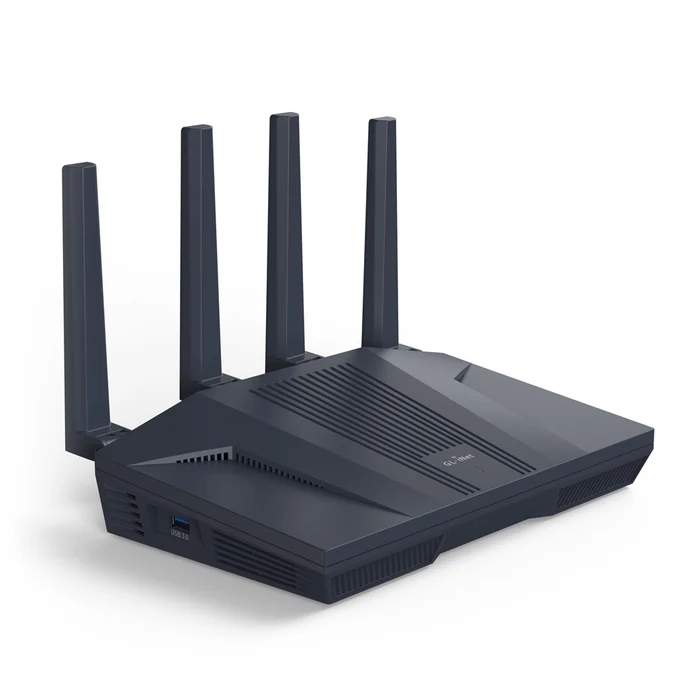
Wi-Fi 6 · 2×2.5G · 4×1G Ethernet
Ordering isn't open yetThe GL.iNet Flint 2. SpiceRouter on top.
SpiceRouter runs on the GL.iNet Flint 2 with GL.iNet's own firmware: proven Wi-Fi 6 hardware underneath, and SpiceRouter's networks, DNS filtering, family controls and AI Connector on top.
Wi-Fi 6, dual-band
AX6000 Wi-Fi on 2.4 GHz and 5 GHz.
Multi-gig ports
Two 2.5G Ethernet ports and four 1G ports.
GL.iNet's own firmware
Your router keeps the firmware GL.iNet ships. SpiceRouter sets it up and manages it, and nothing asks you to flash anything.
Managed by SpiceRouter
The app, the AI Connector, DNS filtering and plan features, on top of the hardware.
Choose the SpiceRouter plan that fits
Your router keeps working without a plan: routing, Wi-Fi and DNS filtering run on the router itself. The app's account features need a plan.
From the SpiceRouter app: Wi-Fi names and passwords, profiles, pauses and schedules, and your network’s recent history. From your AI app: pauses, schedules and routines, with your approval.
- AI Connector: pause, schedule and check on your network from Claude, ChatGPT or another AI chat app, approving every change
- Up to 5 routers, unlimited devices
- Change your Wi-Fi names and passwords from the app
- Parental controls: profiles, pauses and schedules for each person's devices
- 30 days of network history
Everything in Home, plus a separate Business Wi-Fi network and Guest Wi-Fi for visitors.
- Everything in Home
- Up to 10 routers, unlimited devices
- Guest Wi-Fi for visitors, kept apart from your own devices
- A separate Business Wi-Fi network, isolated from your home network
- 90 days of network history
Need more than 10 routers? Contact us
How SpiceRouter Works
Your router
A GL.iNet Flint 2 with GL.iNet’s own firmware, set up and managed by SpiceRouter.
Your plan
Home or Business adds the account side: the SpiceRouter app and the AI Connector.
Just ask
Use the SpiceRouter app, or ask your AI app to pause, schedule or check on your network, approving every change it proposes.
Your network, one message away.
Buy the router once, then choose Home or Business for the app's account features, the AI Connector included.